Task board
Where Plaster's work is planned: capture features, bugs, improvements and ideas by typing or by voice, keep them organised, and hand Claude a batch to work through. Capturing never needs Claude, and nothing goes to Claude until you start a run.
01The board
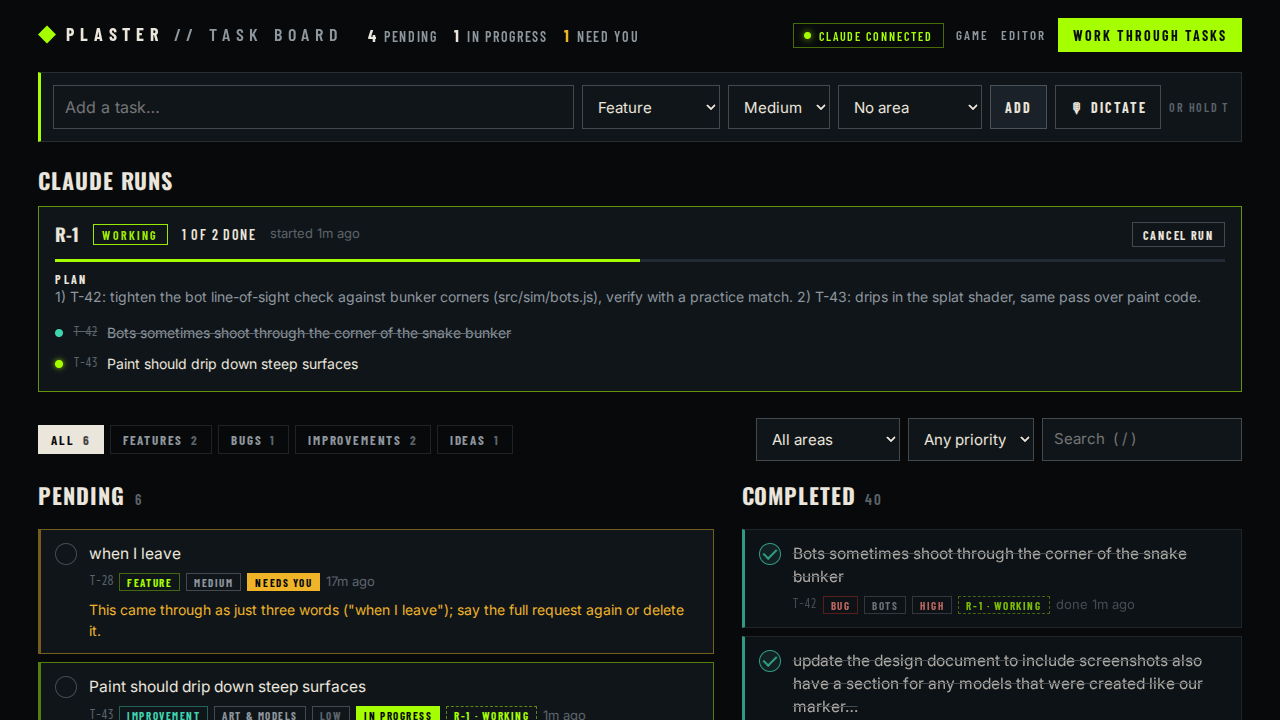 Board
Board/tasks.html (or from POE's toolbar) while npm run dev is running.| Tasks | Title, type (Feature, Bug, Improvement, Idea), priority (High, Medium, Low), an optional area (Weapons, Maps, Multiplayer, Editor, Gameplay, Bots, Menus & HUD, Audio, Art & models, Design doc, Dev tools) and notes. Each keeps a history of who changed what. |
|---|---|
| Add / edit | Type in the quick-add bar and press Enter. Click a task to edit everything, add a note, mark it done, or delete it. |
| Lists | Pending: tasks that need you first, then in progress, then by priority. Completed: newest first. Filter by type, area and priority, or search (/). N jumps to the quick-add bar. |
| Live | Changes Claude makes show up immediately, without losing anything you're typing. |
| Saved | In tasks/board.json, plain JSON in git, so tasks survive restarts and have history. The 40 items from the old TODO.md were imported. |
| Offline | If the dev server goes down, new tasks are kept in the browser and added when it's back; the last board stays visible. |
02Voice capture
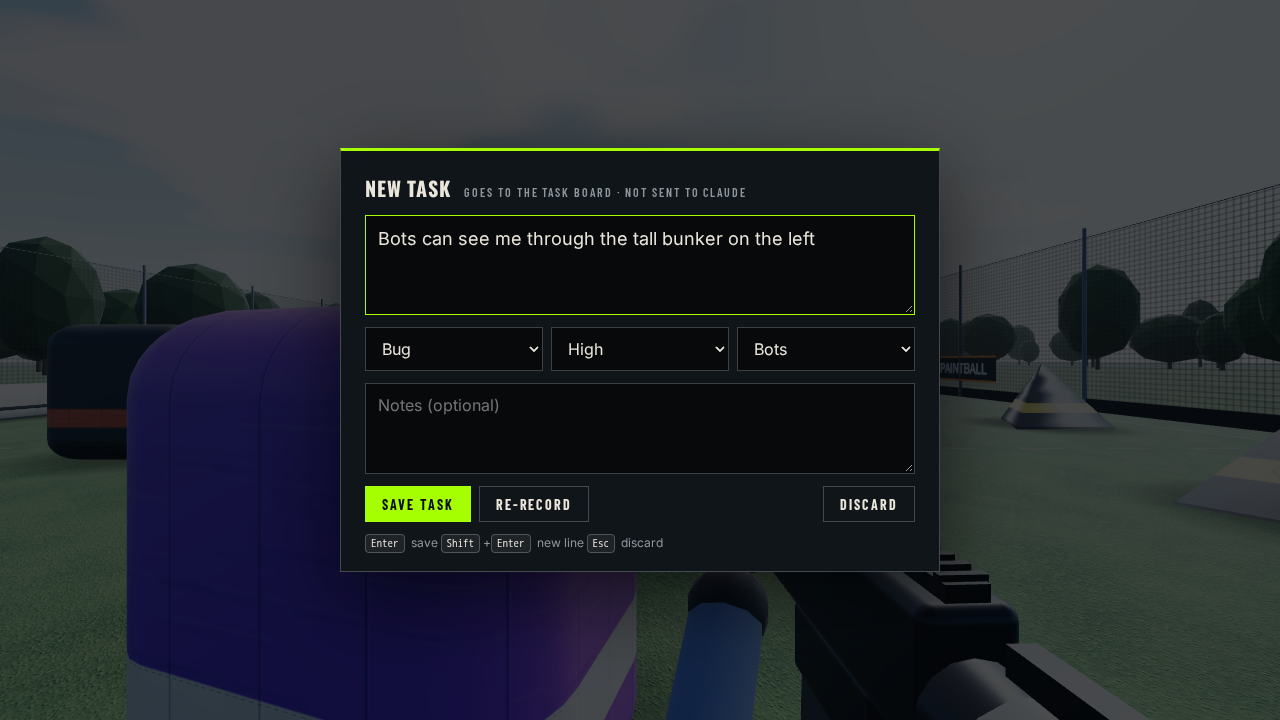 Hold T
| Hold T | On the board, in the main menu or in a match (dev builds only). A pill shows what it hears; releasing T opens the review card. In a match it pauses first, like Esc, and keys typed in the card never reach the game. |
|---|---|
| Dictate | The button next to Add: click to start, click again to review. |
| Review first | Nothing is saved until you press Save. Re-record replaces the text with a new take. |
| Not Claude | Captured tasks only go to the board. V is the separate channel for talking to Claude directly. |
| Browsers | Speech uses the browser's Web Speech API (Chrome or Edge, needs a connection). Elsewhere, T and Dictate open the same card to type into. In Plaster Engine (no speech recognition), View › Open this page in the browser opens the board in Chrome or Edge. |
03Claude works through tasks
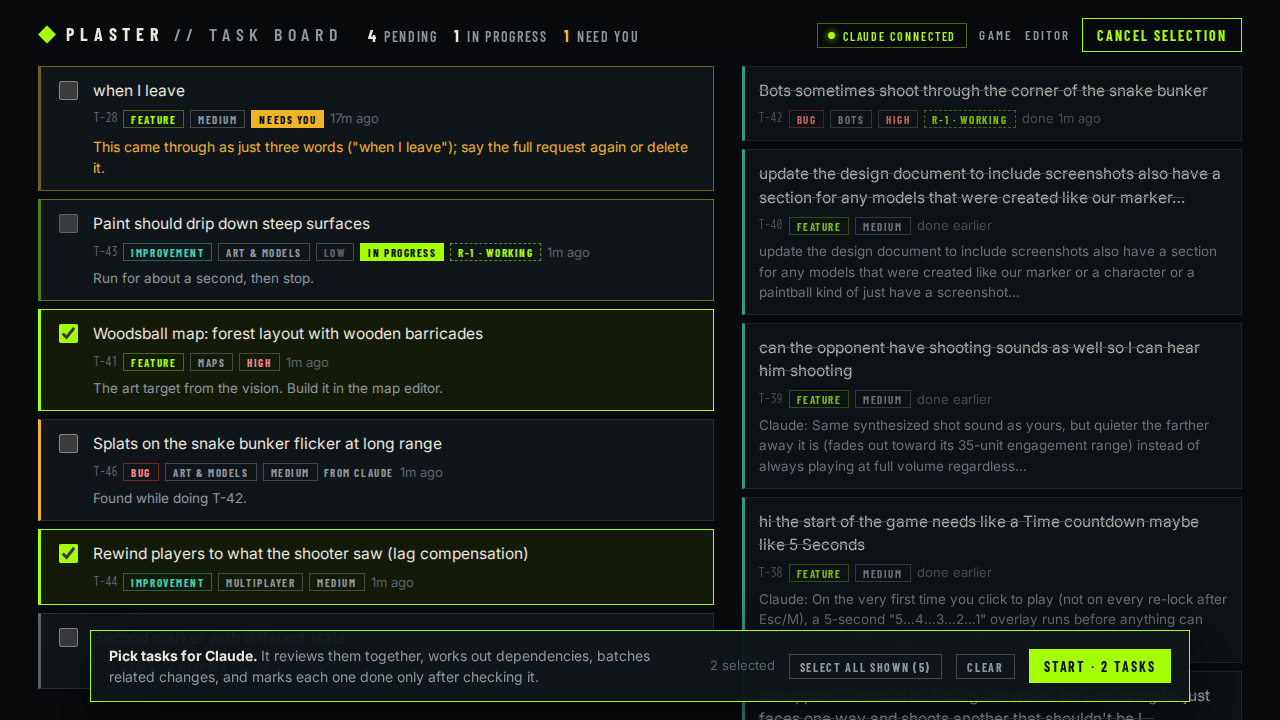 Select
| Start a run | Work through tasks, tick the ones you want, Start. The board creates a run (R-1, R-2 …) and shows it at the top: status, progress, Claude's plan and, at the end, its summary. Cancel any time. |
|---|---|
| Claude's process | Reads every task in the run and the code involved, works out dependencies and groups tasks that touch the same files so each file is changed once, then records the plan. Tasks move to In progress as it works. |
| Done means verified | A task is marked done only after the change is checked as far as practical, with a note saying how. If it fails, or needs a decision or a playtest from you, it stays open as Needs you with the reason. |
| New tasks | Problems Claude finds along the way are added to the board (marked “from Claude”), not quietly fixed or forgotten. |
| Connected? | The header shows Claude connected while a Claude Code session runs node tools/claude-link.mjs. Otherwise runs wait in the queue; tell Claude “work through the task board” (or /plaster-tasks) and it picks them up. |
| Usage limits | The board works without Claude: you can keep capturing and organising when Claude is unavailable or out of usage. A run that's cut short leaves every task's state on the board for the next session. |
04How it fits together
One file, two writers
tasks/board.json is written by the dev server (for the board page) and by Claude's command line, node tools/tasks.mjs. Both go through tools/tasks-store.mjs: a lock file, validation, history, atomic saves. The format is in tasks/README.md.
The Claude link
tools/claude-link.mjs runs inside a Claude session: it keeps the “connected” light on, announces each work request once, and relays V commands. The procedure Claude follows is the project skill in .claude/skills/plaster-tasks.
Dev only
The board page, its API and hold-T capture exist only under npm run dev. Production builds contain none of it.
Replaces auto-work
The old T key wrote to TODO.md and could send items straight to Claude (“auto-work”). That path is gone: captured tasks wait on the board until you start a run.